DJ role and who can control the music
Learn who counts as a DJ, why some controls say "DJ only", and how server managers set DJ mode, DJ roles and DJ commands in the dashboard.
A server can keep some music controls for its DJs.
Who is a DJ
You are a DJ when one of these is true:
- You have a DJ role of the server.
- You have the Manage Messages or Manage Server permission.
- A DJ made you DJ of the session.
- You are the only listener with the bot. See Listener alone in voice.
If a control says that it is for DJs only, ask a DJ to do it, or ask a manager for a DJ role. See Why is this for DJs only?.
/skip is open to everyone when listeners can vote. /forceskip is for DJs. See Skip by vote.
Set the DJ rules
- Open the dashboard with
/dashboard. - Open Music settings, then DJ.
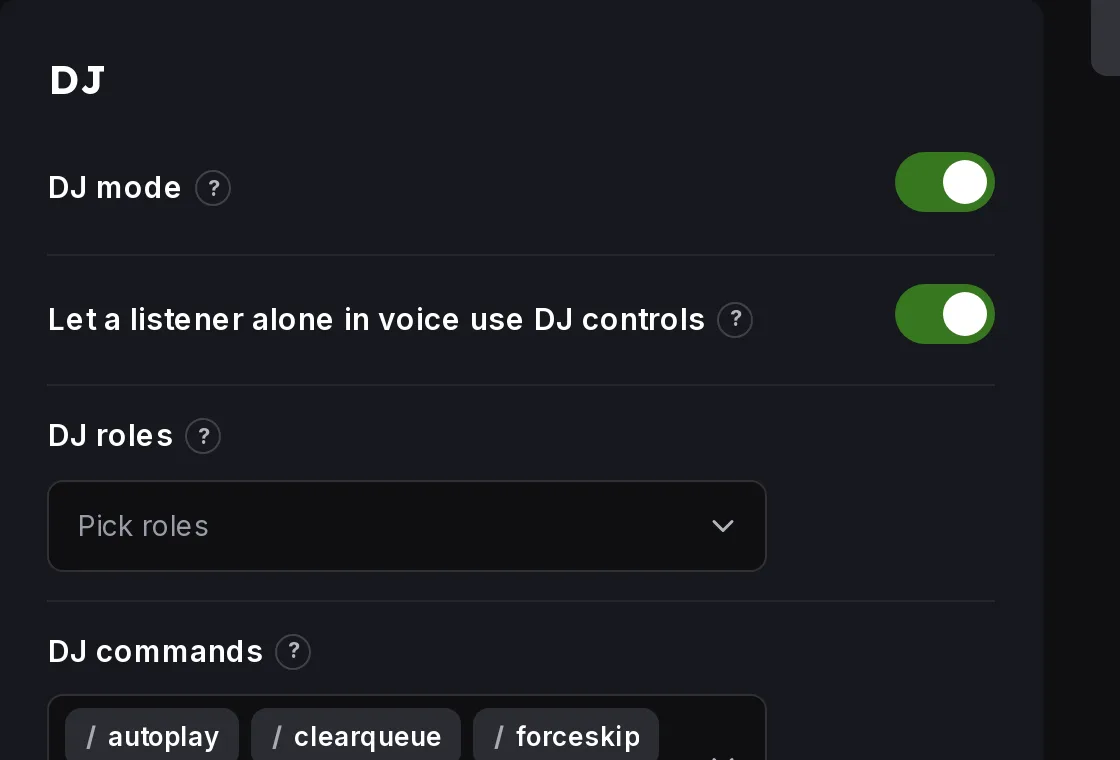 DJ settings
- Use DJ mode to turn the DJ rules on or off.
- Use DJ roles to pick who counts as a DJ.
- Use DJ commands to pick the commands that only DJs can use.
Listener alone in voice
Let a listener alone in voice use DJ controls gives the DJ controls to the only person with the bot. Turn it off if your server uses the bot as a 24/7 radio.
It needs Manage Server
Settings need the Manage Server permission. Ask a server admin, or ask them to give you the permission.
Still stuck? Ask on the support server.
Next steps
Was this helpful?